Fluid type should respond to the card, not the viewport
Pull the handle and watch how the same content either scales smoothly or jumps between preset sizes. The contrast becomes obvious before the card gets anywhere near the full container width.
A practical book with modern CSS techniques, real examples, and UX-focused solutions.
— Written for developers and designers by developer and designer
You know the feeling. You use products like Linear or Apple, and every interaction feels solid, fast, and deliberate. Then you open an average web app: layouts jitter, states break, and the CSS feels like a fragile house of cards.
For a long time, I thought building premium UI required massive engineering teams. But most of the gap comes from treating modern CSS as an engineering discipline, not just a way to paint buttons.
Since it’s 2026, it’s tempting to ask: why not delegate all of this styling to an AI agent? LLMs are incredible for boilerplate, but they are still weak at UI architecture. If you rely on them completely, you hit a ceiling fast.
:has(), @layer, or stronger typographic controls. You cannot prompt your way out of a messy interface if you do not know how things work under the hood. AI is a powerful excavator, but you are still the engineer who has to know where to dig.
Modern CSS for Better User Experience bridges this exact gap. It takes real, frustrating UX problems and solves them with clean, modern CSS patterns, so you can build resilient, premium interfaces that AI will not generate for you by default.
Images
Cropping usually turns into extra wrappers, manual offsets, or image editing. object-view-box lets the browser focus the exact part of the image you want with plain CSS.
.photo {
  object-fit: cover;
  object-view-box: xywh(410px 70px 640px 360px);
}
Alignment
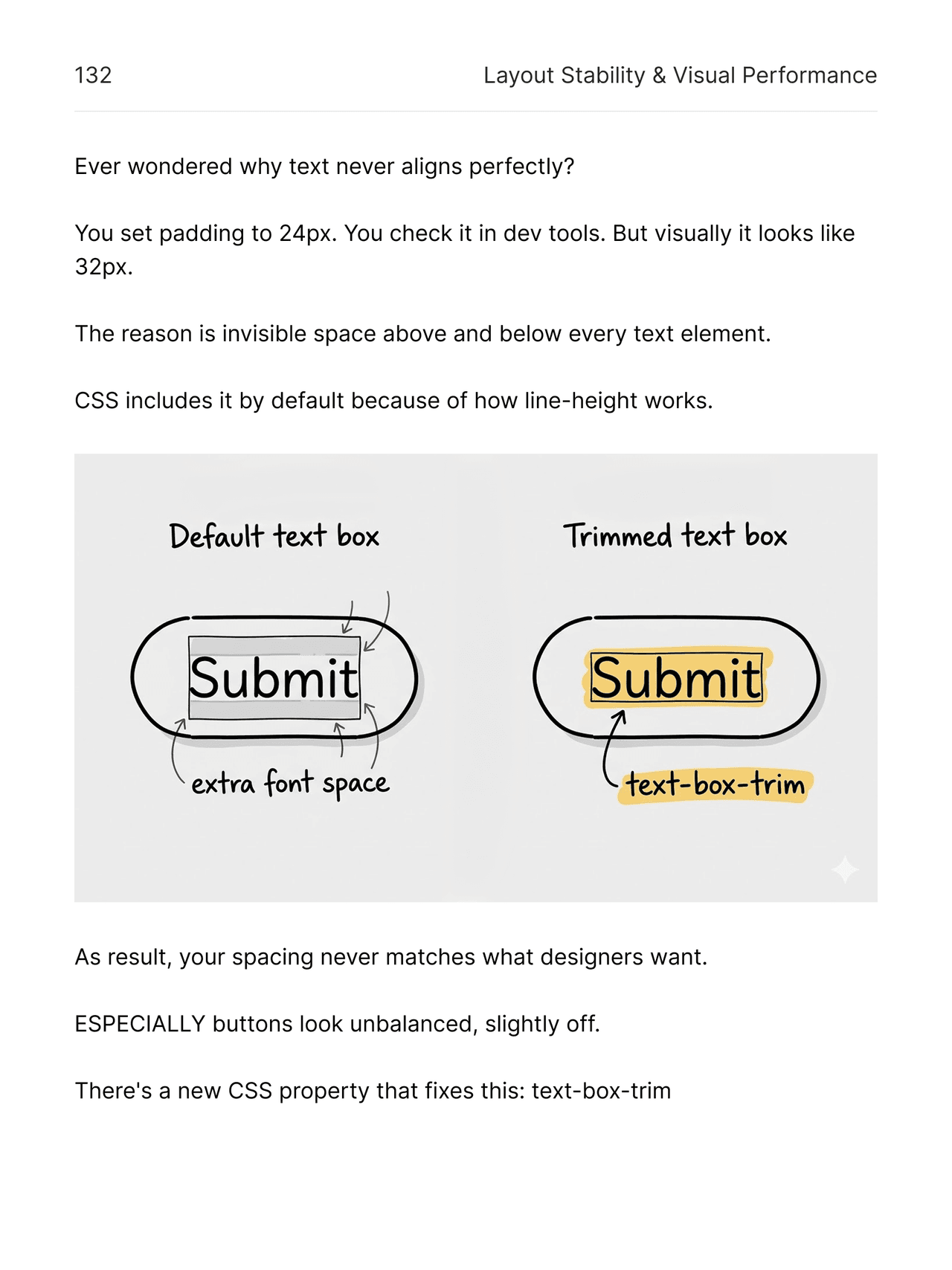
Small spacing errors make polished interfaces feel slightly off. This example shows how text-box-trim removes hidden font space so headings and controls align the way you expect.
Mount Ararat dominates the horizon with two volcanic summits, a long snow line, and a silhouette that stays unmistakable even from far across the valley.

.title {
  text-box-trim: none;
  text-box-edge: auto;
}
Typography
Good type should react to the space it actually lives in, not only to the viewport. This demo compares a fluid clamp() with the abrupt jumps you get from @container breakpoints alone.
Pull the handle and watch how the same content either scales smoothly or jumps between preset sizes. The contrast becomes obvious before the card gets anywhere near the full container width.
.preview-card {
  container-type: inline-size;
}

.title {
  font-size: clamp(0.875rem, 0.625rem + 1.8cqi, 2rem);
}

.body {
  font-size: clamp(0.75rem, 0.625rem + 0.8cqi, 1.25rem);
}Stop fixing AI slop with heavy JavaScript. Master modern CSS and build fast, premium interfaces that LLMs can't generate on their own.
— Written for developers and designers by developer and designer